Access Your Portal
Log in to securely share documents, make payments, and e-sign your returns.
Client Portal LoginOur client portal is a safe, secure, and convenient way of communicating with and sending your sensitive documents to Leatherman Tax & Bookkeeping. Please read through these instructions and explore all the menu options within Atom. If you have questions or issues, please contact our office and we will be happy to assist you.
Atom Portal Walkthrough
- Click "Client Portal Login" above to open the Atom portal.
- Enter the PRIMARY TAXPAYER'S Social Security Number for individuals or EIN for businesses.
- If you're new to the Portal, click "Need a Password or Forgot Password".
- Create a password with at least 1 capital letter, 1 number, and 1 special character.
- If you have a balance due, it will show on the Home Screen. Click the balance, then click the Credit Card button to pay.
To E-Sign Your Document
- Click the hamburger menu icon (3 lines) at the top left to access the main menu.
- Click on the (E-Sign Required) button.
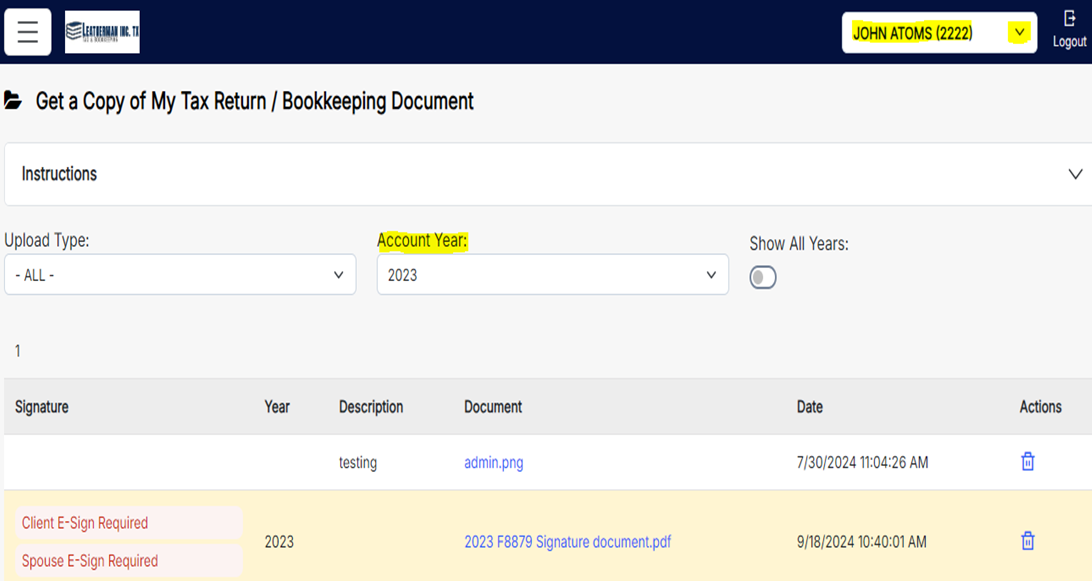
- The Signature column will show "Client" and "Spouse" if married, otherwise just "Client".
- Click on Client E-Sign Required.
- In the pop-up, click Request PIN at the top right. A PIN will be sent via text and/or email.
- Fill out the information. The "Client Name" is the PRIMARY TAXPAYER.
- Click the E-Sign Client button.
If you are married, a new box will pop up to enter the SPOUSE information:
- Request a PIN
- Fill out the spouse's information
- Click the E-Sign Client button
***NOTE*** If you own a business, it will be linked to your personal profile. To access it, click on the dropdown arrow near the top right of the screen and select your business profile.
Troubleshooting
1. "I can't log in."
- Exit the site, close your browser, reopen your browser, and login again.
- Businesses: Sign back in using your EIN with NO DASHES
- Individuals: Sign back in using your SSN with NO DASHES
- ***NOTE*** IF YOU ARE MARRIED, you must log in using the PRIMARY TAXPAYER's Social Security Number
If you are still unable to login, call 817.232.1525 for assistance.
2. "I can't E-Sign my documents" or "Too many attempts have been made, call the office"
- Close your browser, reopen your browser, and login again
- Refer to the E-Signing instructions above, completing each step as described
- Check that you are in the CORRECT PROFILE and Tax Year